An old OpenCode tool record says running. Aladeen calls the session gave_up. Both labels can be correct on their own terms: the first is the last value the runtime recorded; the second is the parser’s interpretation of an old trace with an unfinished call. The trace cannot tell you who stopped the process, whether the command ever finished, or whether the user got what they asked for.
Drafted with AI assistance. The examples use public source and synthetic fixtures, not private transcripts.
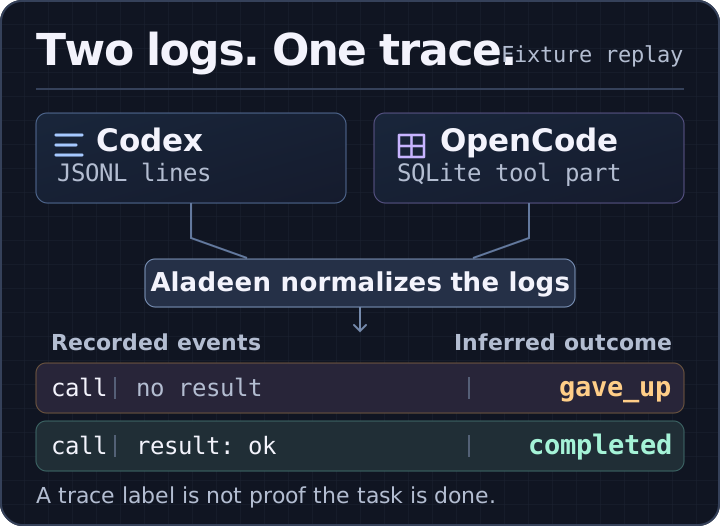
A replay of two synthetic fixtures. No agent or command was run.
Aladeen reads four external runtimes—Claude Code, Codex, OpenCode, and OpenClaw—plus its own blueprint runner. A shared event schema makes those records easier to query. It doesn’t make their evidence equivalent. Here’s where the distinction matters, using one public revision rather than treating today’s parser as a specification for every CLI version.
A missing result is not a failed command
Codex’s rollout records put a function call and its output on separate JSONL lines, linked by a call ID. OpenCode stores the tool and its state together in a SQLite part. Aladeen projects both onto a tool_call and, when there is evidence of a result, a tool_result. Seeing a tool part in SQLite does not mean its invocation is over: Aladeen emits a result only for the terminal states completed and error.
To isolate that distinction, a synthetic comparison fed both ingesters a call for printf fixture, first without a terminal result and then with one. No command or model was run. Codex got JSONL text; OpenCode got fixture rows through the parser’s injected SQL reader, not a live database. Both fixture timestamps were well outside the recent-activity window.
| Input | Codex fixture | OpenCode fixture | Normalized output from both |
|---|---|---|---|
| No terminal result | Call line only | Tool part is running | tool_call; session gave_up |
| Terminal result | Linked output with Exit code: 0 | Tool part is completed | tool_call + tool_result(ok=true); session completed |
The first row doesn’t say ok=false; there is no result to evaluate. The second doesn’t show that an agent solved a task. It shows that the fixture supplied a successful tool result and the outcome heuristic found no stronger signal. That difference matters if you’re counting tool failures, diagnosing cancellations, or deciding whether to trust a run.
The same field can mean different things
| Source | What this Aladeen adapter reads | What the normalized output doesn’t prove |
|---|---|---|
| Claude Code | A tool_use block and its matching tool_result. A successful recognized write can also yield file_change. | file_change comes from the tool call arguments and result, not an independent filesystem diff. |
| Codex | Function calls and linked outputs. For the shell-output format it recognizes, the parser uses the exit code. | If there’s no recognized exit-code prefix, it defaults ok to true. That is a parser convention, not an observed process exit. |
| OpenCode | A SQLite tool part with a call ID, state, and optional timing. The adapter emits a result only when the state is terminal. | A nonterminal snapshot doesn’t prove the tool is still running when you read the report. |
| OpenClaw | JSONL messages and paired tool blocks. A public fixture also exercises token and cost fields when present. | A fixture tests the shapes it contains; it isn’t a compatibility claim for every OpenClaw installation. |
| Aladeen runner | Saved blueprint execution state. Each stored node attempt becomes a tool_call and tool_result. | Here those events represent runner node attempts, not necessarily individual tools called by a model. |
That last row is why a unified “tools used” count can be misleading. One adapter counts transcript calls; another counts attempts at a blueprint node. Both use the same event kind so you can replay them in a common UI. Summing them doesn’t give you a fair comparison of agent behavior.
Keep the evidence separate from the verdict
An agent saying “done,” a tool returning zero, and a check passing in a fresh process are three different signals. Only the last one independently verifies whatever condition the check actually tests. A log can help you find the assertion or command you need to inspect; it can’t turn that command’s output into an acceptance test.
Three things are worth preserving in any dashboard:
- Where it came from. Keep the source and the parser revision. A normalized result should lead back to a record someone can inspect. The source location may only identify a file; in the OpenCode adapter here it identifies the database, not a specific row.
- What is unknown. If the source lacks a terminal result, leave that result absent. If you infer the session outcome anyway, show the rule that produced it.
- What “done” means. For a code task, use an independent check that exercises the requested behavior. Treat
completedin an observability report as a trace label, not proof of delivery.
The five public ingester test files passed 32 tests at the linked revision. That establishes the scope of this check: parser behavior on fixtures, not a benchmark across agents, models, or live CLI versions. For the larger design, see how Aladeen normalizes traces and how to verify an unattended agent loop.